

If you are searching for how to stop confidential data leakage from internal GenAI apps, you are likely moving from pilot experiments to enterprise rollout. The stakes are higher now. You want every team to benefit from faster drafting, clearer meeting outcomes and better knowledge access, but you must prevent sensitive content from slipping through prompts, retrieved context or generated outputs.
This guide sets out a practical, layered approach you can implement in ninety days, anchored around CloudsineAI so every recommendation is either provided by CloudsineAI or clearly integrated with it. By the end, you will have a day-one configuration checklist, boundary controls that work in real time, a governed workspace for sensitive collaboration, a measurement model that executives accept, and an audit-ready evidence pack. For organisations that want implementation guidance, CloudsineAI offers demos and consultations to help you deploy with confidence.
Why Confidential Data Leaks Happen In Internal GenAI And How To Close The Gaps
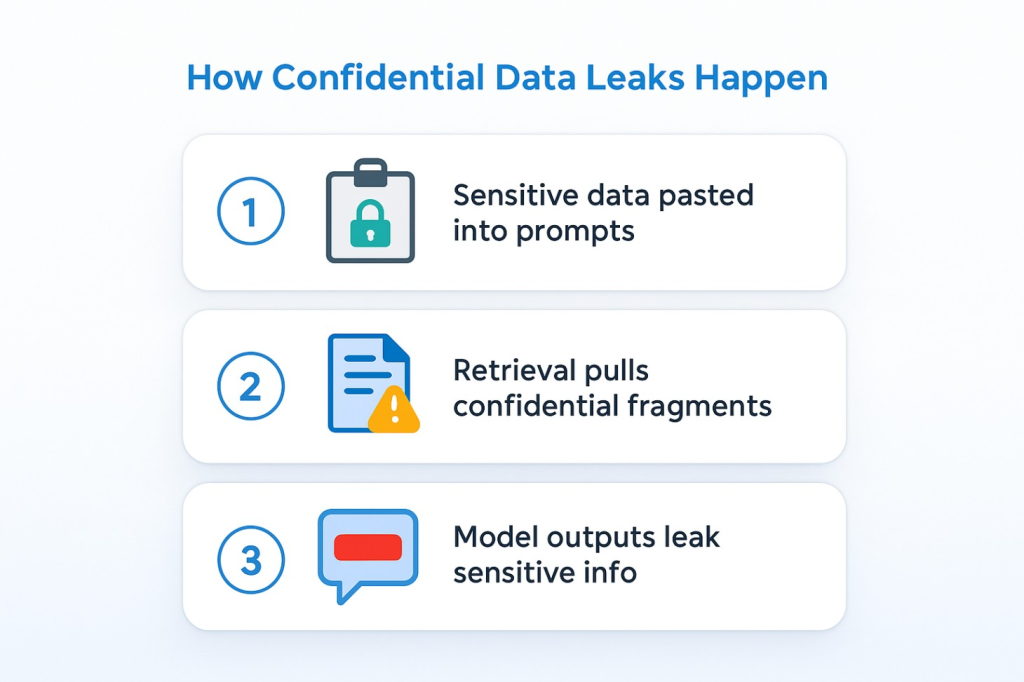
Confidential data can leak through three common routes. First, staff paste sensitive material into prompts to get help summarising, translating or rewriting. Second, retrieval pulls context from internal sources that contain hidden instructions or confidential fragments, and those fragments are then echoed by the model. Third, model outputs themselves may include personal data, system prompts or proprietary tokens unless they are screened and redacted before display. These are not edge cases. They are everyday behaviours in fast-moving teams that need practical guardrails rather than lengthy training alone.
You reduce risk by making safe behaviour the default. That means putting controls in the path of prompts and responses, curating the sources that retrieval is allowed to access, and governing where sensitive collaboration happens. Policy and guidance still matter, but they only work at scale when backed by live enforcement and clear operating rules.
Where CloudsineAI applies?
- GenAI Protector Plus is a GenAI firewall for your own GenAI apps. It inspects prompts and outputs in real time, blocks prompt-injection attempts and prevents sensitive data leakage, aligning with the OWASP LLM risks.
- CoSpaceGPT is a secure GenAI workspace where teams collaborate with multiple leading models under enterprise guardrails, with comprehensive audit logs and private/on-prem deployment options, ideal to reduce shadow tools and uncontrolled copy-paste.
- WebOrion® Monitor provides near real-time website integrity/defacement alerts with AI triage, helping you catch unauthorised visual or HTML changes quickly (brand/reputation surface).
Configure Day 1 Foundations That Reduce Leakage Before A Single Prompt Is Sent
Identity and access
Enable SSO so employees authenticate through your corporate identity provider. Use automated provisioning/deprovisioning for joiners, movers and leavers. Group users by function and sensitivity; apply least-privilege defaults so higher-risk cohorts (Finance, Legal, R&D) have tighter settings. Keep a short configuration pack (owners, dates, screenshots) for reviews.
Retention and training defaults
Decide where prompts/outputs are stored, how long they persist, and whether any content is used for model training. For internal apps that exchange data between services, consider zero retention for high-risk flows. Document regional variations and approvals. Reconfirm vendor statements on data handling regularly so evidence stays current.
Permissions hygiene in collaboration suites
If your internal GenAI extensions integrate with office platforms, review group memberships, sharing settings and site access so retrieval and assistants only see what users are allowed to see. A single broadly shared repository can undermine a careful policy.
DLP as a backstop
Keep enterprise DLP for cross-estate patterns (email, storage, endpoints). Treat DLP as the safety net; use the GenAI firewall as the front-line control where prompts and outputs flow.
Place A GenAI Firewall At The Model Boundary To Stop Leaks In Real Time
Built-in safeguards in model providers are helpful but general. They also change over time as models evolve. The most reliable way to prevent prompt-borne leaks is to insert a policy-enforcing checkpoint between your users/internal services and model endpoints.
Input screening
Before a request reaches the model, detect adversarial instructions (bypass attempts, jailbreaks), flag disallowed data classes (e.g., national IDs, payment data) and scan retrieved passages for hidden directives in wikis/notes. Decide whether to block the request, strip the fragment, or route with higher scrutiny.
Output filtering and redaction
Before a response reaches the user or another system, mask or remove sensitive tokens such as PII, long identifiers, secrets, and system prompts, using domain-specific dictionaries and patterns. Example: only show the last four digits of an account number.
Audit-ready logging
Log prompts, rule hits, actions taken and final outputs. This supports incident response, continuous improvement and fast, factual quarterly reviews.
Operational measures
Set rate and size limits; watch weekly trends. A spike in blocked prompts may signal training needs or mis-tuned patterns. Steady masked tokens often indicate copy-paste from sensitive stores; update guidance accordingly.
Where CloudsineAI applies?
GenAI Protector Plus fills this boundary role. Start with the two or three internal apps that handle the most sensitive content, then route broader usage through them as confidence grows.
Control The Data Layer So Retrieval And Integrations Do Not Reintroduce Leakage
Curate sources. For RAG, index trusted repositories only; label sensitive stores and exclude them until explicitly approved with guardrails. Remove stale or overshared content that pollutes results.
Harden service-to-service paths. Keep secrets out of prompts; rotate credentials; use short-lived tokens with minimal scopes; put egress allow-lists in place so internal services can only call approved model endpoints.
Govern downstream flows. If model outputs create tickets, update wikis or send emails automatically, ensure redaction runs first and add lightweight validation for critical flows.
Where CloudsineAI applies?
Define Protector Plus rules that sanitise retrieved context before the model sees it and suppress prompt fragments hidden in internal notes/wikis; pair with egress policies that only permit calls to approved AI services.
Protect what the public sees without slowing delivery
Internal GenAI often appears in web apps and portals. While your app/API hardening can use native cloud controls and API gateways, you still need to watch public-facing content for tampering.
Add website integrity monitoring to detect unauthorised visual/HTML changes quickly. This is distinct from application testing; it focuses on what the public sees and helps triage incidents fast. WebOrion® Monitor provides near real-time alerts with AI/agentic triage and high-fidelity baselining.
A Step-By-Step 90 Day Blueprint To Reduce Leakage Risk Without Slowing Delivery
You can make measurable progress in three months if you focus on a few high-value workflows and keep evidence tidy.
Days 0 to 15: Map flows, classify data, publish a plain-language policy
Pick two workflows (e.g., meeting follow-ups and recurring drafts). Diagram prompts, context and outputs; label sensitivity and systems. Publish a one-page acceptable-use policy (what belongs, what doesn’t, storage location, how to report issues). Assign owners for policy, configuration and improvement.
Where CloudsineAI applies
Draft a small initial Protector Plus ruleset: block obvious injections; mask high-risk tokens (full account numbers, national IDs, secrets). Start with conservative defaults while you gather evidence.
Days 15 to 45: Turn on guardrails and run two workflows end-to-end
Enable tenant identity/retention; deploy Protector Plus at the boundary for the chosen workflows; route sanctioned usage through it; forward logs to monitoring. If you have DLP, start in monitor mode for a week, then enforce on clearly labelled items. Hold weekly reviews (business owner + security owner): look at blocks, masks, latency, user feedback; adjust rules and guidance.
Days 45 to 90: Add a secure workspace and harden the perimeter
Introduce CoSpaceGPT for teams handling confidential material, so sensitive drafting/research happens in a governed space instead of scattered tools. Onboard primary sites to WebOrion® Monitor for integrity alerts. Summarise outcomes at days 30/60/90. Keep what works, improve what’s close, retire what doesn’t.
Common Leakage Routes You Can Shut Down This Quarter, With Fast Fixes
Oversharing and stale permissions
Review group memberships and external sharing; reduce broad access; time-bound grants. Test that assistants’ ground responses within identity boundaries.
Shadow AI and unmanaged tools
Staff use whatever works. Provide CoSpaceGPT as the governed default to keep retention, access and sharing predictable; use network egress controls to restrict calls to approved AI services from corporate devices and service accounts.
How To Measure Success With Conservative ROI And Clear TCO
Executives fund programmes that show value and control. Keep the model simple and cautious: measure reclaimed time in recurring flows (meeting follow-ups, standardised drafting) using conservative savings per interaction; multiply by real volumes. Add avoided incident costs sparingly, as a single prevented disclosure can offset licences and enablement.
Be transparent about costs: subscriptions (boundary controls, secure workspace, website integrity monitoring), configuration, short training, weekly log reviews, and any cloud usage for virtual appliances. Show an adoption glide path (for many enterprises, one-third of eligible meetings/drafts early, progressing toward two-thirds as confidence grows). Transparency earns trust.
Where CloudsineAI applies
Protector Plus reduces manual checks by handling unsafe prompts/outputs at the source and accelerates investigations with logs. CoSpaceGPT reduces shadow tools by making governed collaboration the obvious choice. WebOrion® Monitor shortens detection time for unwanted website changes, containing reputational risk.
FAQs
Q: Do built-in model safeguards and suite features remove the need for a GenAI firewall?
A: No. Tenant controls and provider safeguards are necessary but general. A GenAI firewall enforces your rules at the precise point where mistakes occur. The exchange of language between people, services and models generates the evidence you need for audits. GenAI Protector Plus fills this role.
Q: How do DLP and a GenAI firewall work together?
A: DLP provides cross-estate coverage; a GenAI firewall prevents prompt-borne leakage in real time. Together, they reduce accidental exfiltration and speed up investigations. Use DLP as the backstop; place Protector Plus at the boundary where prompts and outputs flow.
Q: What is the role of a secure workspace for confidential drafting and research?
A: A governed workspace lowers risk and raises adoption by making the correct behaviour easy. Teams collaborate in shared projects, access multiple models, and work within clear access/retention rules. CoSpaceGPT provides this environment so sensitive work doesn’t drift into unmanaged tools; it also supports private/on-prem deployments.
Where CloudsineAI Fits To Stop Data Leakage At The Source
WebOrion® Protector Plus (GenAI Protector Plus)
A GenAI firewall that inspects prompts and responses in real time, blocks prompt-injection attempts, prevents sensitive data egress and logs interactions for audit/tuning. Use it to protect internal GenAI apps first, then route broader sanctioned usage through it as adoption spreads.
CoSpaceGPT
A secure GenAI workspace for teams that need governed collaboration across multiple models, with comprehensive audit logs and optional private/on-prem deployment. It reduces shadow tools and keeps retention, access and sharing predictable.
WebOrion® Monitor
A website integrity and defacement monitoring that alerts you to unauthorised visual/HTML changes on public sites with near real-time detection and AI triage. Scope is public content, not application code scanning.
Recap And Next Steps
Stopping confidential data leakage from internal GenAI apps is about design, not delay. Set identity, provisioning and retention so foundations are sound. Place a GenAI firewall at the boundary so prompts and outputs are checked in real time. Curate retrieval sources and restrict egress so unsanctioned calls don’t bypass policy. Provide a secure workspace so that sensitive drafting and research are governed by default. Watch your public-facing surface with website integrity monitoring. Review quarterly, keep evidence tidy and scale what earns its place.
Your next step with CloudsineAI
- Book a 30 minute discovery to map top workflows and design a 90-day plan (Protector Plus + CoSpaceGPT + Monitor)
- Request the one-page setup checklist (identity, retention, boundary rules) so Security, IT and Legal align on day one
- Schedule a technical Q&A to walk through boundary rule design, workspace configuration and monitoring with a CloudsineAI specialist.