

If you are evaluating the best generative AI security solutions for enterprises, you have likely moved beyond proofs of concept and into planning for scale. The stakes are higher at enterprise breadth. You need to enable thousands of employees and dozens of applications to use generative AI safely, while satisfying auditors, keeping regulators comfortable, and protecting your brand. This long-form guide explains the risk landscape, defines what truly counts as an enterprise-grade GenAI security solution, and walks through a practical evaluation and rollout approach. It also includes a worked ROI and TCO example, plus a clearly labelled hypothetical enterprise case study so you can see how the layers fit together in a real operating context.
Enterprise adoption is growing quickly. In McKinsey’s latest global survey, 78 per cent of respondents say their organisations use AI in at least one business function, a step up from early 2024, which means expectations for governance, resilience and measurable value are rising in parallel.
Why Enterprises Need Generative AI Security Before Scaling
Enterprise adoption has broadened across everyday work
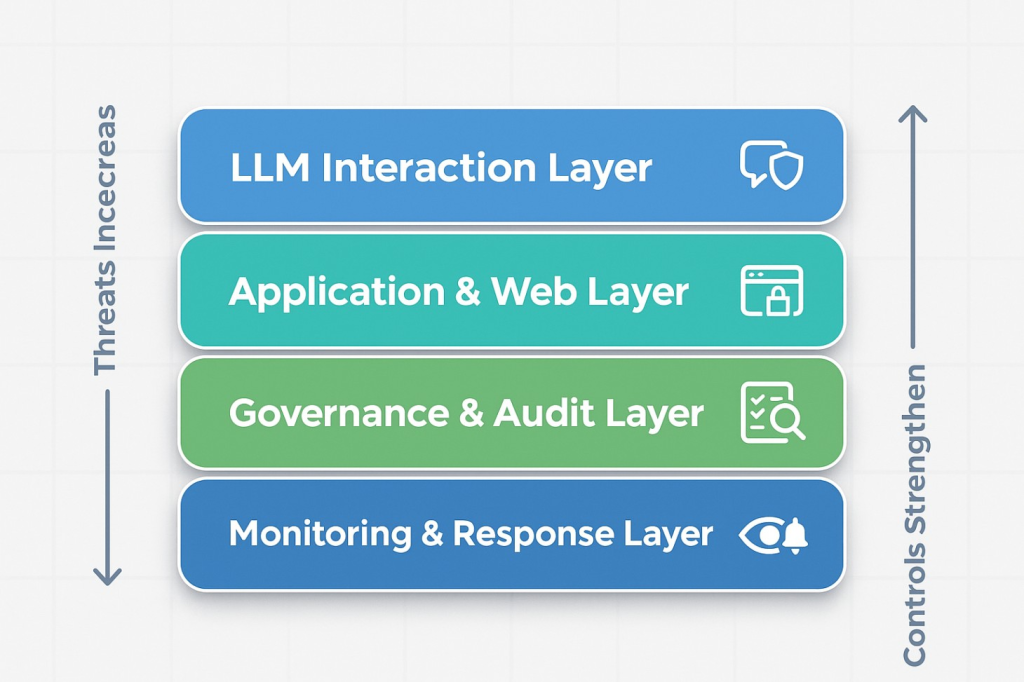
Generative AI no longer lives only in specialised teams. Meeting platforms, chat tools, knowledge systems, developer environments and customer support channels all embed AI assistance. That helps organisations move faster, but it also increases the attack surface. The surface is twofold. First is the LLM interaction layer, where new risks, such as prompt injection, insecure output handling, training or retrieval data poisoning, model denial-of-service attacks, and supply chain vulnerabilities, emerge. Second is the application and web layer, which still faces classic threats like injection, XSS, bot abuse and authentication exploitation.
Security teams do not have to start from scratch to describe these threats. The OWASP Top 10 for LLM Applications provides a well-recognised taxonomy that maps neatly to enterprise governance, including LLM01 Prompt Injection, LLM02 Insecure Output Handling, LLM03 Training Data Poisoning, LLM04 Model Denial of Service and LLM05 Supply Chain Vulnerabilities. Using this shared language helps security, IT and product leaders align on which controls to deploy and how to test them during pilots and audits.
Governance has to be visible, repeatable and auditable
Boards and regulators increasingly expect not only policies, but also operational evidence that AI risks are being governed. The NIST AI Risk Management Framework (AI RMF) offers a practical structure across the functions of Govern, Map, Measure and Manage, helping enterprises turn policy intent into day-to-day activities that can be inspected. A good enterprise plan uses AI RMF to set the rhythm of reviews, risk decisions and improvements, then grounds those expectations in product-level controls that teams can run without friction.
Layered security works best for GenAI
Enterprises discovered long ago that no single control stops every attack. The same holds for GenAI. You will reduce risk faster by combining an LLM-aware firewall with a secure workspace for employees and website integrity monitoring to protect public content. That layered approach addresses distinct failure modes while keeping productivity high. CloudsineAI’s product set maps to these layers directly, which we will outline next
What Counts As The Best Generative AI Security Solutions For Enterprises In 2025
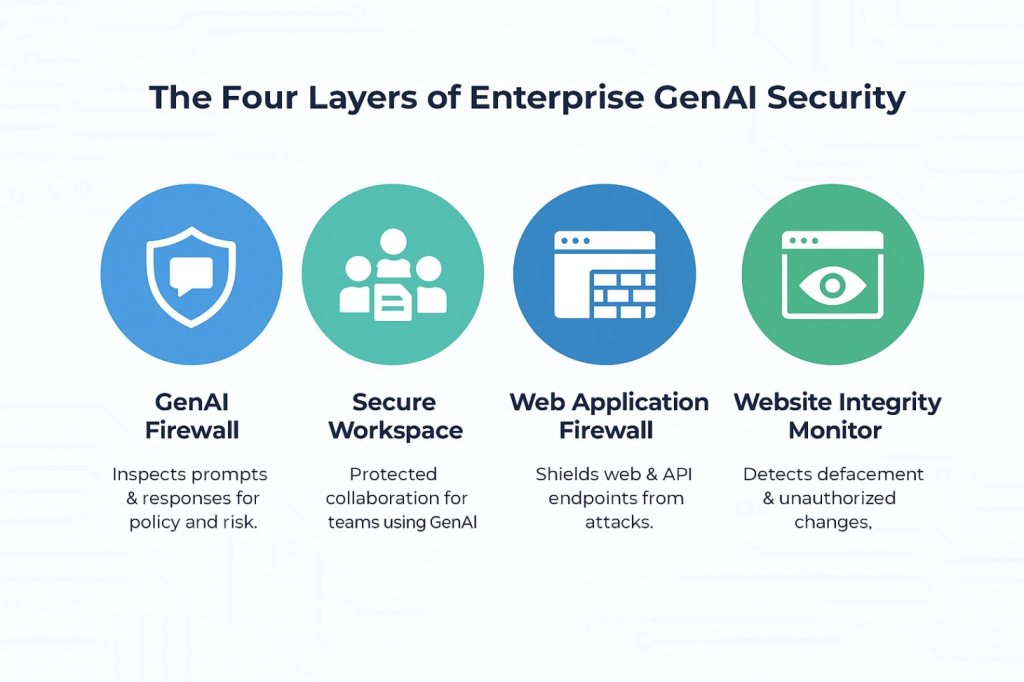
Think in layers rather than point products. A coherent enterprise stack typically contains 3 complementary capabilities.
1) GenAI firewall for prompts and responses
A GenAI firewall is a specialised control point that sits between users or applications and the model providers. It inspects prompts before they reach the model and filters outputs before they reach users or downstream systems. The goals are simple to state and critical in practice: block prompt injection attempts, prevent sensitive data egress, enforce policy consistently and log interactions for audit and tuning.
CloudsineAI’s GenAI Protector Plus is presented as an advanced GenAI firewall designed to secure your GenAI applications with guardrails and to protect proprietary GenAI apps. Protector Plus can be deployed as SaaS or as a cloud virtual appliance, which suits different enterprise architectures and control preferences.
2) Secure GenAI workspace for teams
Enterprises cannot rely on ad hoc use of consumer tools. A secure, governed workspace gives teams a sanctioned place to collaborate with multiple leading models, share projects, and build on each other’s work without risking leakage of confidential information. CloudsineAI highlights CoSpaceGPT as a secure GenAI workspace where teams work together on shared projects while keeping sensitive information protected. This lets you enable employees without losing governance.
3) Website integrity and defacement monitoring
Attackers still seek to deface public websites or inject malicious content. That is reputational risk. A monitoring layer that watches for unauthorised visual or HTML changes, and triages alerts with AI, helps teams respond quickly. WebOrion® Monitor focuses specifically on website integrity and defacement monitoring, providing near real-time alerts and intelligent baselining to separate dynamic and static content so you get high-fidelity signals instead of noise.
These four layers address different classes of risk and together form an architecture that is straightforward to explain to both engineers and executives.

How To Evaluate Enterprise-Grade Solutions With A Five-Part Framework
A structured evaluation keeps selection focused on outcomes, not marketing promises. Use the framework below to filter contenders quickly.
1) Coverage of core GenAI risks
Ask vendors to demonstrate how they detect and block prompt injection, handle insecure outputs, and mitigate poisoning. Use OWASP’s LLM Top 10 to define test cases and acceptance criteria. For example, request that vendors show how their system responds to hidden instructions in retrieved documents, to outputs that contain sensitive tokens that must be masked, and to unusually heavy prompts that resemble model denial of service. This creates a shared checklist across security and product teams.
2) Integration into your stack and workflows
Controls only help if they fit your environment. For a GenAI firewall, confirm secure proxy patterns, authentication flows, token management and SIEM integration. For a secure workspace, verify SSO, role-based access controls, retention settings and the set of models supported.For website integrity monitoring, confirm you can deploy in preferred regions and integrate alerts with your SIEM and incident tooling. CloudsineAI documents that Protector Plus can operate as SaaS or as a cloud virtual appliance, offering flexibility for enterprises that need tighter platform control.
3) Admin control, policy and audit
Security administrators should be able to define policies in readable terms, version them, and deploy changes safely. They should be able to disable features in sensitive contexts and archive logs that support audit and investigation without heavy manual effort. In a secure workspace, admins should see usage analytics and have clear retention tools.
4) Compliance and assurance
Use the NIST AI RMF as your umbrella for governance and risk language. Map solution features to the RMF’s Govern, Map, Measure and Manage functions so that internal audit can follow the thread. Record who approves which risks, how you measure control effectiveness, and how often you update policies. Clear evidence makes compliance less stressful and more predictable.
5) Scalability and total cost of ownership
Pilot-scale success does not guarantee enterprise-scale reliability. Ask for guidance on throughput, latency and failover. Budget for licences, enablement, monitoring and governance. The most cost-effective solution is often the one that removes manual checking and reduces rework. Protector Plus is positioned for enterprise scale and can be deployed as a managed service or as a virtual appliance, which helps align with both cloud-first and controlled environments.
If you are briefing stakeholders who are new to the firewall concept, CloudsineAI’s explainer “What is a Generative AI Firewall and Do You Need One?” provides a non-technical overview that many steering groups find helpful to read before a pilot review.
How To Calculate ROI And TCO For Enterprise AI Security
Security is not just a cost centre. When you remove manual steps, avoid incidents, and accelerate everyday work, you create measurable value. Use a simple, conservative method and present scenarios transparently.
A worked example for meetings, drafting and incident avoidance
Assume a multinational enterprise runs 1,000 recurring weekly meetings with 10 participants. Your baseline is manual notes and action tracking. With summarisation and action extraction, you reclaim 15 minutes per participant per meeting on average.
- 1,000 meetings × 10 people × 15 minutes = 150,000 minutes saved per week
- 150,000 minutes equals 2,500 hours per week
- At a conservative loaded labour cost of $70 per hour, that is $175,000 per week of reclaimed value, or roughly $9.1 million per year, assuming 52 weeks with minor discounting for holidays and learning curves.
Now add avoided incident costs. Suppose you estimate that a single sensitive data disclosure incident would cost $250,000 in response, fines and remedial work. If your GenAI firewall prevents even one such incident per year by blocking unsafe outputs or prompt injection, that is a meaningful addition to the benefit narrative.
TCO elements to account for
- Licences and platform: GenAI firewall, secure workspace, and monitoring.
- Enablement: Initial configuration, short training, policy drafting and review.
- Governance operations: Weekly log reviews, quarterly policy updates, and incident rehearsals.
- Monitoring and SIEM: Integration and ongoing alert handling.
- Cloud costs: For virtual appliances and traffic egress if applicable.
Present ROI as gross savings plus avoided costs minus TCO. Provide two scenarios. A conservative case that assumes only 30 per cent of meetings adopt summarisation and a target case that reaches 60 to 70 per cent adoption over six months. Decision-makers respond well to realistic ranges with clearly stated assumptions.
For guidance on cultural rollout and safe employee enablement alongside the numbers, see CloudsineAI’s article “How to Safely Enable Generative AI for Employees.” It includes practical communication patterns and workspace tips that reduce shadow use.
Step-By-Step Guide To Selecting And Deploying The Right Layers
The following sequence balances speed with control. Each stage builds evidence that you can show to executives and auditors.
Step 1: Map use cases, data flows and the attack surface
Catalogue where GenAI is used today and where you plan to expand. Include usage in meeting and chat platforms, knowledge systems, developer tools and customer-facing features. Draw the data flows for prompts, intermediate artefacts and outputs. Mark which data classes are in scope at each step. This simple diagram becomes your shared reference for risk decisions.
Step 2: Write a plain-language policy and align it with AI RMF
Draft a one-page acceptable use policy. State what is appropriate to input, what is restricted, and how outputs are handled. Align the policy and its operational checklists with NIST AI RMF so everyone understands how you Govern, Map, Measure and Manage risks. Keep it readable so adoption is natural rather than forced.
Step 3: Place a GenAI firewall at the boundary
Deploy CloudsineAI’s GenAI Protector Plus as a secure proxy for proprietary GenAI apps. Start with conservative prompt screening, output filtering and redaction. For internal usage, enforce data loss prevention by masking secrets and personal data, allowing-listing retrieval sources and logging all traffic. For external usage, lock system prompts, detect and block injections and jailbreaks, restrict tools and domains, validate outputs and refine rules using audit logs.
Step 4: Provide a secure workspace so employees have a sanctioned place to work
Roll out CoSpaceGPT for project teams that need a shared environment with multiple models and enterprise guardrails. Configure SSO, role-based access and retention. Publish a simple internal guide of effective prompts and do and do not rules. CoSpaceGPT is highlighted by CloudsineAI as a secure environment that keeps confidential information protected while teams collaborate, which reduces the incentive to use unmanaged tools.
Step 5: Monitor website integrity and defacement
Add WebOrion® Monitor to watch your public websites for unauthorised visual or HTML changes. Use its high-fidelity baselining and GenAI triage to reduce false positives and route alerts to the right teams. This is about protecting the public face of the enterprise and catching incidents early, not about application code scanning.
Step 6: Measure outcomes and scale what works
Define metrics before the pilot begins. Examples include hours saved in meeting follow-up, first draft creation time, actions captured and completed, incidents blocked by the firewall, defacement detection time and the percentage of employees using the secure workspace. Review results at thirty, sixty and ninety days. Keep the workflows that show durable improvement and retire those that do not.
Hypothetical enterprise case study: securing a global tech company with CloudsineAI
This case study is hypothetical and is provided for illustration only to show how a layered approach can work in practice.
The context
A global technology company employs 75,000 people across North America, Europe and Asia-Pacific. The company ships both software and embedded devices. Engineers and product managers had begun experimenting with consumer AI tools, which created a risk that sensitive R&D content could leak. The organisation also launched AI-powered features on customer portals and a developer community site, increasing exposure on the web surface. The CISO needed to enable AI usage without growing the attack surface uncontrolled.
The goals
- Reduce shadow use by providing safe, sanctioned tools with clear rules.
- Enforce guardrails for prompts and outputs across sanctioned usage.
- Build an evidence trail for internal audit aligned with AI RMF.
The deployment
Boundary control with WebOrion® Protector Plus.
The company is launching an LLM-powered customer support chatbot and has chosen to place GenAI Protector Plus as a secure proxy in front of the app. The firewall locks the system prompt, detects and blocks prompt-injection and jailbreak attempts, restricts tools and outbound calls to approved APIs and domains, validates outputs before display, and masks sensitive terms using defined DLP rules. All interactions are logged and forwarded to the SIEM for monitoring and audit.
Secure employee enablement with CoSpaceGPT.
The CIO’s office rolled out CoSpaceGPT to R&D, product marketing and customer support. SSO and role-based access were configured so that project spaces matched the organisation structure. A short usage guide defined what belonged in CoSpaceGPT and what should remain in the product-specific tools. Adoption rose quickly because teams could share AI sessions, build on each other’s prompts and keep context without copy-paste.
Public reputation protection with WebOrion® Monitor.
The company’s marketing and community sites were added to WebOrion® Monitor. The integrity monitor created intelligent baselines and used NLP to classify suspicious HTML changes. Alerts flowed into existing incident channels so the response team could act quickly. Monitoring focused on websites, not application code analysis, which clarified responsibilities and reduced confusion.
The results after ninety days
- Shadow AI usage fell as teams adopted CoSpaceGPT
- The firewall blocked multiple prompt injection attempts during red-team testing and masked several potential sensitive outputs that would otherwise have left the environment.
- Website integrity alerts identified a misconfiguration in a regional site before it became a public incident.
- Leadership approved the expansion because the programme aligned cleanly with NIST AI RMF and produced an audit trail that the internal audit could follow.
What made it work
- A single control point at the LLM boundary that enforced corporate policy in real time.
- A secure workspace that made it easy for employees to do the right thing without friction.
- Website integrity monitoring to protect reputation while the AI programme is scaled.
Common Mistakes Enterprises Make And How To Fix Them
Mistake 1: Assuming native model filters or suite features are enough
Many foundation models and productivity suites include general safety filters. They are helpful, but they are not tuned to your policies or your data, and they can change with provider updates.
Fix: Place an enterprise GenAI firewall at the boundary so prompts and outputs are inspected under your rules. Use OWASP LLM Top 10 to shape tests and keep control logic focused.
Mistake 2: Delaying governance until a late stage
Enterprises sometimes start with ad hoc adoption, then bolt on governance later. That increases the risk of leakage or audit gaps that slow the programme.
Fix: Write a one-page policy early, align it with AI RMF, publish it with plain-language examples, and turn it into checklists for admins and product owners.
Mistake 3: Ignoring employee enablement
If employees do not have a safe, sanctioned way to use AI, shadow use will grow.
Fix: Provide a secure workspace such as CoSpaceGPT and communicate its purpose. The workspace becomes the default location for sensitive drafting, brainstorming and research, which reduces unapproved usage.
Mistake 4: Confusing website integrity monitoring with application security testing
These are complementary layers. Integrity monitoring detects unauthorised changes to public content and layout, while application security testing analyses code and logic.
Fix: Use WebOrion® Monitor for website defacement and integrity alerts, and keep application scanning in your SDLC. This clarity makes operations smoother and audit narratives cleaner.
Mistake 5: Over-promising compliance in public materials
Overstating certifications or guarantees creates audit risk later.
Fix: Use recognised frameworks like NIST AI RMF for structure, and keep public claims aligned with what your vendors publish on their own pages.
Deep-Dive FAQs For Enterprise Buyers
Q: Can GenAI security be deployed without disrupting current workflows?
A: Yes. A firewall can run as a secure proxy that applications and sanctioned employee usage route through, which minimises code changes. A secure workspace like CoSpaceGPT sits alongside existing tools and provides governance for sensitive work. CloudsineAI documents both SaaS and virtual appliance options so teams can pick what fits their architecture and compliance needs.
Q: How should we balance controls with productivity in the first ninety days?
A: Start narrow, measure, then expand. Enable the firewall with conservative rules, roll out the secure workspace to willing early adopters, and monitor firewall logs and website integrity signals closely. Share weekly summaries that show hours saved, actions captured and incidents blocked. Make small policy adjustments based on real usage. This builds trust.
Q: Which frameworks should guide governance and technical controls?
A: Use NIST AI RMF for programme governance and risk language, then implement technical tests based on the OWASP Top 10 for LLM Applications. These two references give you a top-down and bottom-up structure that internal audit, legal, security and product stakeholders can all follow.
Q: Does website integrity monitoring replace security testing?
A: No. Integrity monitoring protects your public presence by spotting unauthorised changes in near real time, supporting incident response and brand protection. Application security testing remains part of your SDLC. Treat them as complementary. WebOrion® Monitor provides defacement and integrity alerts for websites (not application code scanning), which is why it pairs well with your existing SDLC practices and observability tooling..
Conclusion And Enterprise Next Steps
Choosing the best generative AI security solutions for enterprises is not about chasing the longest feature list. It is about implementing a layered architecture that delivers clear control points at the model boundary, in the employee workspace, and on the web surface, with visibility over what the public sees on your sites. When those layers are in place and governed under a recognised framework, you can scale AI usage with confidence and speed.
CloudsineAI’s portfolio is designed for this approach. GenAI Protector Plus provides a GenAI firewall for prompts and outputs so you can enforce policy in real time across sanctioned usage. CoSpaceGPT gives teams a secure workspace that keeps confidential information protected while they collaborate with multiple models. WebOrion® Monitor watches websites for defacement and integrity issues so you can detect and respond quickly. Together, these layers help you reduce risk, demonstrate governance and preserve momentum as AI becomes part of everyday work.
If you want a clear primer for your steering group, start with “What is a Generative AI Firewall and Do You Need One?”, then follow with “WebOrion® Protector Plus: Secure Your Critical GenAI Apps.” These pieces help non-specialists understand why a firewall sits at the centre of the enterprise GenAI architecture.
Ready to map your use cases to a layered security plan with concrete pilots and measurable outcomes? Reach out to set up a short discovery and a ninety-day plan that covers boundary controls, secure workspaces, and web surface protection.